Video Downloader & Story Saver
- 4.8
- Rating
- 10.00M
- Installs
- Free
- Price

 Analysis by App-foxy
Saving a video or a story sounds simple until the usual sharing tools leave you switching between apps, losing track of files, or accepting a visible watermark. Video Downloader & Story Saver takes a more direct approach: it is a free Android app in the video players and editors category, built around downloading videos and saving stories. After spending time with it, I found its strongest quality is not flashy editing, but the way it can fit into a repeatable save-and-organize routine.
Video Downloader & Story Saver is made by Video Downloader & Fast Saver, and its store summary highlights saving stories and downloading videos without a watermark. That description is a useful starting point, but the real question is whether the app makes everyday saving convenient. My answer is yes, with a few important qualifications: it is best for people who want a focused downloader, not a complete media studio or a replacement for every platform’s own offline feature.
How the everyday download workflow feels
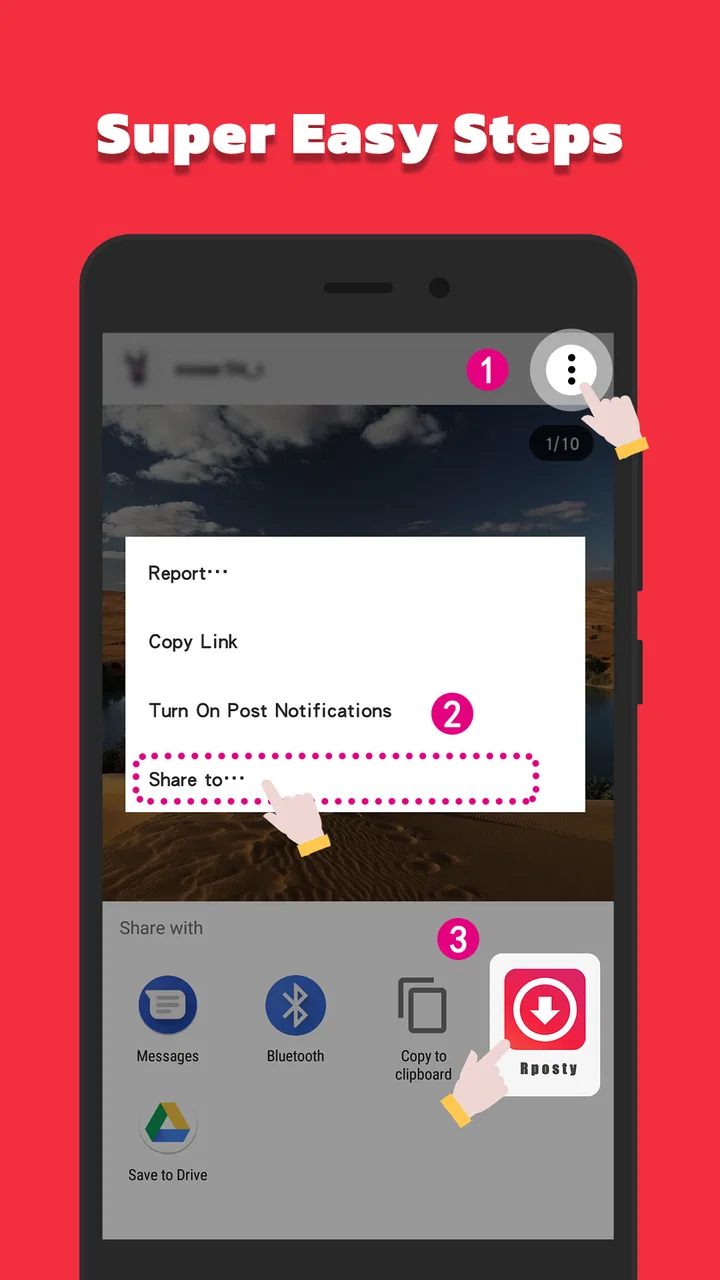
The basic routine is easy to understand. I find the video or story I want to keep, use the platform’s sharing or copying option when available, return to the downloader, and let it process the item. The appeal is that the task stays centered on saving media rather than opening a full editor with tools I do not need. For occasional downloads, that shorter path is more comfortable than manually moving files through several apps.
You May Also Like

 Blood Strike: 2.5 Anniversary
Blood Strike’s Loadouts Turn Every Drop Into a Tactical Gamble
A close look at Blood Strike’s custom loadouts: how fast access to signature weapons reshapes its battle royale rhythm, rewards preparation, and narrows the gap between fights.

 Pandora - Music & Podcasts
Pandora’s Music Is Easy to Start, but Harder to Recover
Pandora’s strength is its low-effort path from a seed to a station. Its weak spot is how much confidence it asks you to place in connection, setup, and quiet recovery.

 8 Ball Pool
 Is Built on Rivalries, Rematches, and Routine
A close look at the rivalries, rematches, shared routines, and unanswered safety questions that turn a quick pool match into a persistent mobile community.

 Samsung Music
’s Quiet Strength Is Playing What You Already Own
Its reach comes less from spectacle than from dependable access to a personal library. That simplicity is both the app’s strongest retention engine and its ceiling.

 AccuWeather: Weather Radar
AccuWeather Review: A Quick, Clear Forecast for Everyday Decisions
For everyday plans, the best forecast is the one you can understand quickly. AccuWeather makes rain timing, radar, and local conditions easy to act on, with a few trade-offs.

 Hill Climb Racing
Why Hill Climb Racing Still Turns Crashes Into One More Run
A tiny car, a bumpy hill and one more upgrade: Hill Climb Racing keeps resurfacing because its simple chaos makes every near-miss feel personal.
More From Our News Desk



A realistic example is a story from a friend that contains useful travel information. Instead of taking a screenshot and losing the moving image or audio, I can use the saver to keep the original visual post for later reference. The same approach works for a short instructional clip I want to revisit while offline, provided I have the right to save and reuse it. I would not treat the app as a way around a creator’s wishes or a platform’s rules.
The no-watermark focus is particularly useful when a saved clip is intended for personal editing later. A watermark can cover captions, faces, or small details, so removing that distraction keeps the downloaded file cleaner. Still, “no watermark” does not mean the app grants permission to republish someone else’s work. I always separate technical convenience from copyright and privacy responsibilities.
One habit makes the workflow much less frustrating: decide where saved files belong before downloading a large batch. If everything remains mixed with camera photos and messaging attachments, the app may do its job while the phone becomes harder to manage. I prefer downloading only what I will actually use, then moving important clips into a clearly named folder or backing them up through my normal phone tools.
What makes it practical for regular users
The app’s purpose is narrow enough to be approachable. Someone who only wants a story saver does not have to learn a timeline, transitions, filters, or export presets first. That simplicity also helps when a family member asks how to preserve a clip: the explanation can focus on finding the media, sending it to the downloader, and checking the result.
It is also useful for temporary offline reference. I might save a recipe demonstration before cooking, a workout clip before leaving home, or a short tutorial that I expect to consult more than once. In those cases, the value is not collecting everything; it is reducing repeated searching. A small, intentional library is easier to use than a phone filled with forgotten downloads.
The app is free to install, which lowers the barrier for trying this workflow. It includes in-app purchases ranging from under a dollar to several dollars per item, so I would check any purchase screen carefully before confirming anything. For a person who downloads only now and then, the free starting point may be enough. Someone who wants every available convenience should decide whether those optional costs fit their habits rather than assuming all functions will be free.
Settings I would check before saving often
Experienced use begins with a short settings check. I look for options related to download behavior, storage location, notifications, and the way the app handles completed files. The exact choices available can depend on the current build and the phone, so I would not blindly enable everything. The goal is to make the app quiet and predictable, not to give it more access than the task requires.
Storage deserves special attention. Video files can accumulate quickly, and a downloader can make that easy to overlook because each individual save feels small. I recommend checking the destination after the first successful download, opening the file from the phone’s gallery or file manager, and confirming that the result is where you expect. This simple test prevents a common nuisance: searching through several folders later because the first save went somewhere unfamiliar.
Notifications are another practical choice. If I am saving one clip, a completion alert can be useful. If I am processing several items, repeated alerts may become noise. I prefer keeping useful completion feedback while reducing anything that encourages me to check the phone constantly. A downloader should support a task in the background, not turn every save into an interruption.
I also check the app’s version information when troubleshooting. The current version is 1.5.21R, and the app runs on Android 7.0 or newer. That makes it suitable for many older Android phones, although performance still depends on the device, available storage, network quality, and the source platform. If a download behaves differently after an update, I would first close and reopen the app, verify the copied source, and test with a single small item before assuming the entire workflow is broken.
Small habits that make repeated downloads faster
The quickest users do not necessarily tap faster; they remove unnecessary decisions. I keep the source app and downloader arranged where they are easy to reach, and I avoid starting a download until I know exactly which clip I want. Copying the correct source first is usually faster than launching the downloader repeatedly and correcting mistakes afterward.
For a group of related clips, I use a simple naming and cleanup habit outside the downloader. I save the items, verify that they play, and then sort them by topic or event. This is more reliable than trusting memory. It also makes it easier to delete duplicates, especially when the same story or video is encountered through multiple shares.
Another useful pattern is to download on a stable connection when the file matters. A weak connection can make a successful-looking process take longer or require another attempt. I would rather save one important clip carefully than queue a large collection and discover later that several files are incomplete or unusable. The app can simplify the transfer, but it cannot make an unreliable network reliable.
When I need a clip for editing, I check it before importing it into another app. I confirm that the picture is clear enough, the audio is present, and the beginning and end are intact. This matters because a downloader is not the same as an editor: it gives me a saved media file, but I still need a separate tool for trimming, captions, color changes, or a more polished export.
These habits also reduce accidental storage waste. I avoid downloading several quality versions of the same item unless I have a clear reason. If the purpose is simply watching later, one usable copy is enough. If the purpose is editing, I keep the best practical source and remove temporary tests after the project is finished.
Where it stands beside ordinary alternatives
The usual alternatives each solve part of the problem. A platform’s own save or offline button is often the safest choice for content that should remain inside that service. A screenshot is quick for a still image, but it loses motion and sound. Screen recording works in more situations, yet it can capture notifications, interface elements, or lower-quality output. A full file manager gives more control, but it is less friendly for someone who wants a straightforward video-saving routine.
This app sits between those options. It is more purposeful than a screenshot and less complicated than a general file-management workflow. Its watermark-free positioning is a practical advantage when I need a clean source for personal editing. On the other hand, I would choose the platform’s official offline option when I only need temporary viewing and want the content to remain tied to the original service.
I would also choose a dedicated editor instead when the main goal is creating a finished video. The downloader can be the first step, but it should not be mistaken for the whole production process. That distinction is important for new users: saving a clip and making a publishable project are separate jobs, and this app is focused on the first one.
Limits that matter before relying on it
The largest limitation is that downloaders depend on the source and the way a platform exposes content. A copied link may not always behave the same way, and stories can be temporary or restricted. If a source is private, expired, region-limited, or protected by a service’s rules, I would not expect a third-party saver to turn it into a normal public file. When the workflow fails, the cause may be the source rather than the phone.
There is also a responsibility issue that should not be skipped. Saving a public clip for personal reference is different from reposting it, removing attribution, or distributing private material. The clean output can make reuse tempting, but I would ask the creator first when the content is not mine. The app’s technical function does not change ownership or consent.
Storage and organization remain user responsibilities. The app can save media, but it cannot decide which files still matter to me months later. I would periodically review downloads, remove duplicates, and keep sensitive stories away from shared devices. This is especially important if several people use the same phone or if automatic backup includes the download folder.
Privacy is another reason to use restraint. I avoid pasting links from private conversations into tools unless I understand exactly what I am saving and why. I also pay attention to Android’s permission prompts and decline access that is unrelated to the task. A focused downloader should be used with the same caution as any app that handles personal media.
Finally, optional purchases deserve a deliberate decision. The app costs nothing to install, but in-app items range from $0.99 to $7.99 each. I would use the basic workflow first, see whether it solves my actual problem, and only then consider an upgrade. That approach is better than paying for convenience before knowing how frequently I will download.
Who will appreciate it most
I think it is a good fit for Android users who regularly save short videos or stories for personal viewing, reference, or later editing. It is especially appealing if a watermark would get in the way and if a dedicated saver feels easier than juggling screenshots, screen recordings, and file tools. The Everyone age rating also makes the app broadly approachable, though responsible use still matters for the content being saved.
It is less suitable for someone who wants a complete social-media production suite, automatic cataloging, or a guaranteed method for every platform and private post. Heavy creators may prefer a workflow built around a professional editor and organized cloud storage. Users who only watch content inside an official service may find that service’s own offline feature simpler and more appropriate.
My final take after building a routine around it
Video Downloader & Story Saver succeeds because it concentrates on a task many people otherwise handle awkwardly. I like it as a practical first step: find the right media, save it without an unwanted watermark, verify the file, and organize it before the downloads pile up. The experience becomes noticeably better when paired with sensible storage habits and a clear distinction between personal use and reposting.
Its 4.8 average from over 367 thousand ratings and more than ten million installs suggest that the straightforward idea resonates with a large Android audience. Those figures do not remove the need to test it with the platforms and content I personally use, but they do place it among the more established choices in this narrow category. The developer is Video Downloader & Fast Saver, and the app was released on March 28, 2024.
My recommendation is therefore specific rather than universal: try it if you want a focused, free downloader for stories and videos and you are willing to manage files responsibly. Start with one harmless, non-private clip, confirm the saved result, review the settings, and decide whether the basic experience is enough. The best results come from treating it as a reliable saving tool, not as a shortcut around platform rules or a substitute for a real video editor.
FAQs for Video Downloader & Story Saver
01Is Video Downloader & Story Saver free to use?
Yes, Video Downloader & Story Saver offers a free version with basic features. However, to access advanced functionalities such as high-speed downloads and ad-free experience, there might be in-app purchases or a premium subscription available. Be sure to check the app store listing for any costs associated.
02Can Video Downloader & Story Saver download content from all social media platforms?
Video Downloader & Story Saver is compatible with a wide range of social media platforms, including Instagram, Facebook, and Twitter. However, some platforms may have restrictions or frequent updates that could affect compatibility. It's advisable to check the app's description for the most current list of supported platforms.
03Is it legal to download videos using Video Downloader & Story Saver?
While Video Downloader & Story Saver provides the technical capability to download videos, users must ensure they have permission to download and use the content. Downloading copyrighted material without permission may violate terms of service or laws. Always review the legal guidelines for each platform before using the app.
04How does the app ensure user privacy and security?
Video Downloader & Story Saver is designed with user privacy in mind. It does not require unnecessary permissions beyond what's needed to function. Additionally, it doesn't store personal data on their servers, ensuring user privacy. However, always read the privacy policy to understand how your data is handled.
05Does Video Downloader & Story Saver support HD video downloads?
Yes, Video Downloader & Story Saver supports HD video downloads, allowing users to save high-quality videos directly to their devices. However, the quality of the downloaded video may depend on the original video’s quality and the settings chosen within the app. Always check the app settings for the best results.
Pros
- Simple and intuitive interface.
- Supports multiple video formats.
- Fast download speeds.
- Allows batch downloading.
- Built-in media player.
Cons
- Contains intrusive ads.
- Limited editing features.
- Requires internet for most functions.
- No cloud integration.
- Occasional download failures.

Video Downloader & Story Saver
Gallery